For a first trial, choose a process that comes up often, with accessible information, exceptions that can be spotted and a person responsible for approving the result. In the example below, following up quotes meets these conditions before preparing quotes or sorting incoming requests. The grid helps you understand this choice and question it if your data is different.
The example: a fictional renovation business
To illustrate the method, let us take a fictional eight-person renovation business: a manager, an administrative assistant, a site supervisor and five tradespeople. Nothing in this example describes a real client; the situations are built to show the reasoning.
Three processes keep coming up in internal discussions:
- Sorting incoming requests: messages received through the form, by email or by phone, to be qualified and then distributed.
- Preparing quotes: site visit, measurements, choice of materials, pricing.
- Following up quotes that have been sent: spotting quotes that have had no reply and deciding when to follow up with the customer.
Five criteria to compare processes
Each process is examined against five criteria:
- Frequency: the task comes up often enough for automation to be of practical interest.
- Data: the information needed exists in a structured and reliable form.
- Access: this data can be reached technically, in software, a spreadsheet or a mailbox, without workarounds.
- Exceptions: special cases are known, few in number and easy to detect.
- Owner: a person is named to follow the process, approve the outputs and decide when in doubt.
For each criterion, the assessment is qualitative: favourable, to check or unfavourable. There is no numerical score and no adding up. One unfavourable criterion on data or exceptions can be enough to rule out a process, even if everything else is favourable. Adding up points would hide exactly this kind of blocker.
The grid applied to the example
| Criterion | Sorting requests | Preparing quotes | Following up quotes |
|---|---|---|---|
| Frequency | Favourable | To check | Favourable |
| Data | To check | Unfavourable | Favourable |
| Access | To check | To check | Favourable |
| Exceptions | To check | Unfavourable | To check |
| Owner | Favourable | Favourable | Favourable |
Qualitative grid drawn up for a fictional business. The assessments are not scores and do not add up.
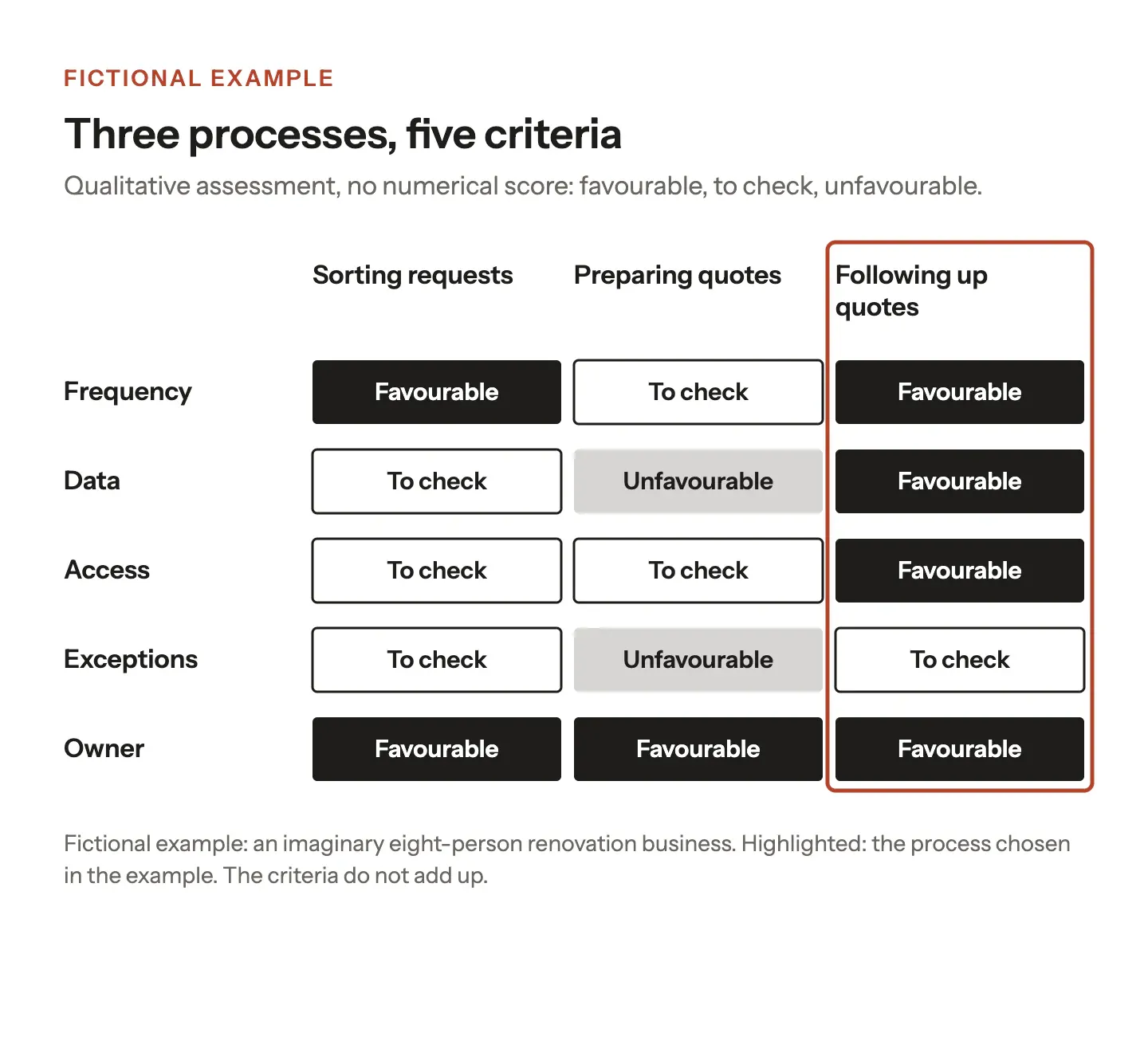
Visual representation of the grid above. The colours show the assessments favourable, to check and unfavourable, without any score.
Sorting requests. Requests arrive often and the assistant already follows them up. However, they come through three channels, in different formats. We do not yet know whether the useful information, such as the site address, the type of work or the desired deadline, is consistently present. Access to the mailbox and the phone system still needs to be checked, as does the share of unusual requests. It is an interesting candidate, but too many points remain open for a first trial.
Preparing quotes. This is the task the manager would most like to lighten. Yet it relies on information gathered on site, measurements and a technical judgement about the condition of the building. Each job has its own particularities. With unfavourable data and unfavourable exceptions, automating here from the start would risk pricing errors that are hard to put right.
Following up quotes. Quotes that have been sent are recorded in a spreadsheet, with a sending date, an amount and a status. The data is structured and accessible. The exceptions still need to be checked: a customer who replied by phone without the status being updated, or a quote replaced by a corrected version.
The choice: following up quotes, under conditions
In this example, following up quotes is the most reasonable candidate. This choice remains conditional.
An owner is named. The administrative assistant reviews the list of suggested follow-ups and reports to the manager. Without this person, the process is not launched.
No message is sent automatically to a customer before approval. During the trial, the system prepares a list of quotes to follow up, and possibly a draft message. A person reviews and decides on each send. Automatic sending is only considered after a period of approval that the owner judges satisfactory.
Stop rules are written down. If the quote date is missing, or if the status shows that the quote has already been accepted, processing stops for that quote, which goes to manual review. Following up with a customer who has already signed does more harm to the relationship than forgetting a follow-up.
A simple rule may in fact be enough, without AI: a filter in the spreadsheet showing quotes sent more than ten days ago with the status “pending”, plus a weekly reminder. In my view, starting with this version is the safest way to check that the data holds up. A layer of AI, for example to suggest a follow-up draft adapted to the context of the job, is only justified once this foundation is reliable.
Defining access and the data that can be used
A site address or a customer message may contain personal data. Before connecting the tools, specify which information is needed, who can see it and which conditions apply at each provider. For the trial, use fictional or properly anonymised data. If an AI service is involved, check its terms of data use and its settings; do not assume the rules are the same from one tool to another. The CNIL and France Num guides for small businesses (in French; the CNIL is the French data protection authority) give pointers for this preparation. The grid proposed here remains a teaching example, with no certification value.
Testing before going live
Before any real use, prepare a few test cases from fictional or anonymised quotes. For each one, note the expected behaviour and the evidence you will keep.
| Test case | Fictional example | Expected behaviour | Evidence to keep |
|---|---|---|---|
| Normal case | Dated quote, sent fifteen days ago, status “pending” | The quote appears in the follow-up list | List produced, quote checked by hand |
| Missing data | Quote with no sending date | Stop for this quote, flagged for manual review | Line flagged, no follow-up suggested |
| Status already accepted | Quote signed but still in the list of sent quotes | Stop for this quote, no follow-up | Line flagged with the reason for stopping |
| Duplicate | Same quote entered twice, or two versions of the same quote | A single follow-up suggested, duplicate flagged | List showing the duplicate detected |
| Error | Inconsistent date or spreadsheet unavailable | Processing stops, alert to the owner, no partial list | Alert message received by the owner |
The aim of these tests is not to prove a return on investment set in advance. It is to show that the list is correct, that doubtful cases are stopped and that the owner understands why each quote appears. You can compare durations during the trial on equivalent cases, then check in real use what the corrections and exceptions change. No gain is established before this measurement.
Applying the grid to your own processes
To use this grid in your business:
- List two or three candidate processes, each described by its expected result.
- For each criterion, write one sentence of justification in addition to the assessment.
- Turn each “to check” into a specific check, assigned to a person and dated.
- Set aside for now any process judged unfavourable on data or exceptions.
- Do not choose any process without a named owner.
- Write the stop rules and the test cases before choosing a tool.
A process set aside today is not set aside for good. In the example, preparing quotes can be reconsidered once the data is better structured.
Building a process you can monitor and manage
The grid helps you choose a first task. To put it into service, you still need to connect the tools, handle missing data, test the exceptions and define who takes over. In the quotes example, these decisions are what distinguish a follow-up to prepare from a case to review.
I can help you move from this choice to an automation suited to your business. We define the scope, the access and the approval rules. I set up the connections, test the agreed cases and hand over the documentation with a handover session.
You receive an explicit way of working: what the system handles, what it flags and how to step in when a case falls outside the rules. The accounts used remain yours. To prepare our conversation, describe the task, the tools you use and a case that causes problems; this information will help define the project and its quote. The demos show fictional examples of these workflows.